Event Email Marketing: A Practical 2025 Guide for Packed In‑Person & Online Events

08/10/2026

Marketing Strategy

Learn how to build high-converting event email campaigns that fill more seats, keep attendees engaged, and turn every event into a powerful driver of leads, revenue, and long-term customer relationships.

Event email marketing lifecycle illustration showing registration, confirmation, reminder, attendance, follow-up, and post-event survey email campaigns.

Event email marketing is still one of the most reliable ways to fill seats, increase event attendance, and keep attendees engaged before and after the event. Whether you are promoting a June 2025 product launch, a September 2025 industry conference, or a January 2026 workshop, the goal is the same: send the right message to the right audience at the right time.

Quincy Samycia
Play IconPause Icon
0:00
0:00

Event Email Strategy for Better Attendance

Event logistics email illustration featuring venue directions, arrival instructions, mobile access, parking details, and attendee communication.
Event email content series showcasing speaker announcements, agenda updates, networking invitations, and attendee engagement before and during an event.
Event invitation email illustration highlighting registration, waitlists, reminders, event announcements, and attendee communications.
No items found.

Key Takeways

  • A focused email campaign can be the top driver of registrations and show-up rates for both an in person event and online events.
  • The best results come from a planned sequence: announcement email, invitation email, reminder email, confirmation email, and follow ups.
  • Segmentation and email automation help event marketers reach the right audience with relevant content instead of sending generic blasts.
  • Track open rates, click-through rates, ticket sales, and event registration data to improve every new event email.
  • The event email examples and email templates below can be adapted for webinars, regional meetups, hybrid events, and conferences.

What Is Event Email Marketing (and Why It Still Works in 2025)?

Event email marketing means using email campaigns to promote, manage, and recap events across the full event lifecycle. That includes event promotion, event registration, event reminders, logistics, thank you emails, and the post event email that turns attendees into a warm list for future events.

Email marketing drives event attendance through targeted, timely communication. It also helps build excitement and anticipation for events by allowing marketers to share enticing details, a sneak peek, speaker updates, early bird pricing, and other details that can significantly boost registration rates.

Core benefits include:

  • Direct access to your target audience without depending on social media sites or algorithm changes.
  • Lower cost per registration compared with many paid channels.
  • Easier measurement of registrations, conversion rates, click through rates, and ticket sales.
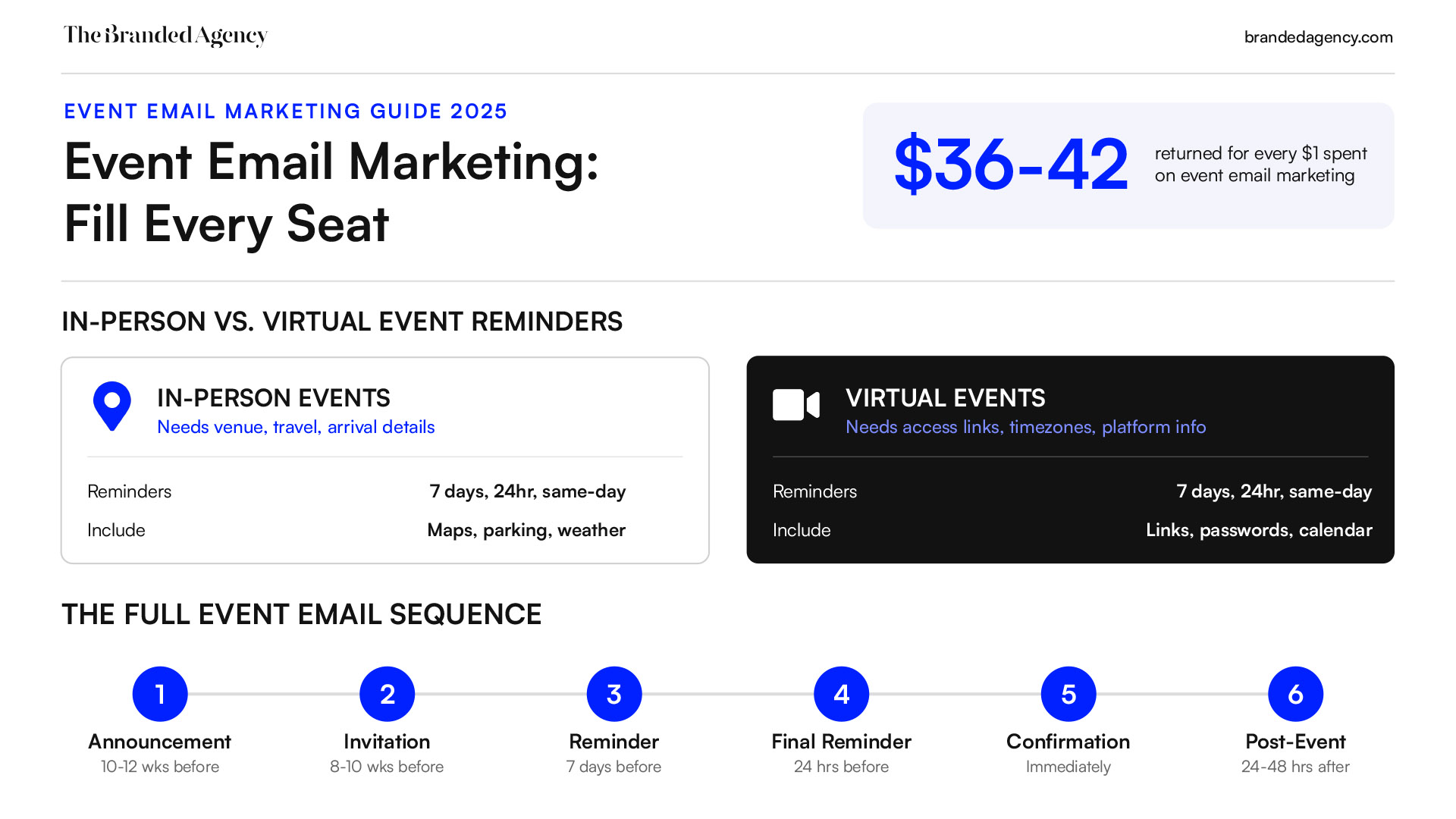
  • Strong ROI: email often returns about $36–$42 for every $1 spent, according to recent email ROI research from Verified Email.

A survey found that 59% of marketers believe email is more than twice as effective at generating leads compared to channels like PPC and paid social media. Email marketing is considered one of the most effective channels for promoting events, with 59% of marketers believing it is more than twice as effective at generating leads compared to other channels like PPC and paid social media.

A perfect event email is not about design tricks. It is about event timing, a clear subject line, tailored content, and one primary action.

Defining Your Event, Goals, and Right Audience

Effective email marketing for events starts before the first invitation email. You need to define the event, the audience, the outcome, and the event marketing strategy.

A 150-person workshop in October 2025 needs local messaging, practical event details, and urgency around limited seats. A 1,000-person hybrid conference in March 2026 needs different paths for virtual attendees, traveling attendees, VIPs, sponsors, and speakers.

Set SMART goals, including increasing registrations, such as:

  • Sell 70% of tickets by the early bird deadline.
  • Reach 35% email open rates on the announcement email.
  • Reduce no-shows below 25% with event reminders.
  • Increase purchase tickets clicks by 20% from the first invite.

Define the right audience by job titles, industries, locations, past attendee data, and behavior. For example, people who attended a similar event in 2024 but have not bought yet should not receive the exact same message as new subscribers.

Start with basic segmentation so you can speak directly to each group: past attendees vs new leads, local vs traveling attendees, VIPs vs the general audience, and current customers vs cold leads.

Core Event Email Types Across the Event Lifecycle

Event invitation email campaign featuring personalized messaging, event details, registration CTA, testimonials, and promotional content.
Post-event email workflow illustrating thank-you messages, content recaps, attendee feedback, follow-up communications, and next event promotions.
Event reminder email illustration featuring ticket confirmations, calendar invitations, preparation checklists, venue details, and event logistics.
Event email automation workflow displaying scheduled campaigns, registration reminders, countdown emails, confirmations, and attendee communications.

Event emails come in various types, including invitations, reminders, confirmations, and follow-ups, each serving a unique purpose throughout the event lifecycle. Effective email event promotion relies on a structured sequence including a clear “Save the Date” announcement, an invitation with a strong Call-To-Action (CTA) to register, segmented follow-ups, and an urgent “last chance” reminder.

A simple campaign calendar should include:

  • Announcement email
  • Invitation email
  • Event reminders
  • Confirmation emails
  • Logistics updates
  • Post-event follow-up emails

Send a sequenced series featuring an invite, value-add reminder, and last-chance urgency deadline to design an effective event email campaign.

Announcement Email: First Signal Your Event Is Coming

The announcement email is your first event promotion message once the event name, city, date, and core theme are set. Send it 10–12 weeks before a major in-person event, or 4–6 weeks before a smaller webinar.

Structure it like this:

  • Email subject line with city or specific dates.
  • Short intro with the exciting news.
  • Basic event details: date, location, format.
  • CTA to join a waitlist or interest list.

Example: “Austin, November 2025: Tech Summit is coming.” The body can tease keynote speakers, breakout themes, and early bird discounts without pretending the full agenda is final. Keep the design simple, scannable, and mobile-friendly.

Invitation Email: Turning Interest Into Registrations

An event invitation email is the first communication that provides essential details about the event and includes a call-to-action to encourage registrations. Send it 8–10 weeks before an in-person event, or 2–3 weeks before a webinar.

A strong invitation email includes:

  • A benefit-driven subject line.
  • One hero image or bold headline.
  • Three to four outcome-focused bullets.
  • Social proof, such as testimonials, speaker names, logos, or photos from past events to increase interest.
  • One CTA button, such as “Register Now.”

Example:

Subject line: “Leadership Summit 2025 – Early-Bird Tickets Now Available” CTA: “Register Now” Secondary text link: “View agenda”

Past attendees might see a loyalty angle. New leads might get more context on why the upcoming event matters.

Event Reminders: Reducing No‑Shows and Last‑Minute Drop‑Off

Reminder emails convert registrations into actual event attendance. For in-person events, send one reminder 7 days before, one 24 hours before, and one same-day reminder 2–3 hours before doors open.

For online events, include access links, passwords, time zones, and a calendar link in every reminder. Automated emails can be scheduled to send reminders and follow-ups, ensuring that attendees are kept informed and engaged leading up to the event.

Keep the tone useful, not pushy. Add parking info, weather notes, venue maps, platform links, or preparation tips. VIPs, speakers, and standard attendees should receive tailored reminders that match their role.

Transactional & Logistics Emails: Confirmations and Updates

Confirmation emails reassure attendees that their registration was successful and often include additional information about the event, such as agenda details or preparation tips. Send these immediately after registration or payment.

Include:

  • Attendee name
  • Ticket type
  • Date and time
  • Location or streaming link
  • Calendar file or calendar link
  • Hotel suggestions, community link, or preparation checklist

Logistics update emails should be short and searchable. Use direct subject lines like “Room change for [Event Name]” or “Updated arrival details for Friday.”

Post‑Event Emails: Thank‑Yous, Recaps, and Next Steps

Post-event emails serve to thank attendees, share highlights, and encourage further engagement with the brand or upcoming events. A simple post-event sequence includes:

  • Thank-you email within 24–48 hours.
  • Recap with slides, recordings, or photos within 3–5 days.
  • Next event offer within 7–10 days.

Example for a September 2025 conference:

“Thanks for joining us at [Event Name]. Here are the slides, the photo gallery, and a 3-minute survey. Your feedback helps us plan the next event and improve future events.”

You can also reuse event photos or screenshots in recap emails and related social posts.

Highly engaged attendees can receive “Apply to speak in 2026.” Local attendees can receive “Join our next in-person meetup in your city.”

Want to learn more about brand platforms, Brand Strategy and Brand Identity? Keep reading!

If you need help with your companies brand strategy and identity, contact us for a free custom quote.

Writing and Designing the Perfect Event Email

Event email campaign management dashboard featuring attendee engagement metrics, registration performance, click-through rates, conversions, and revenue analytics.

Great event email design supports the message and reinforces your event branding and identity. It does not distract from it. Each email should maintain a single primary Call-To-Action, such as “Register Now,” because including a clear call-to-action (CTA) in your emails is essential for guiding recipients towards the desired action, such as registering for the event.

Subject Lines and Preview Text That Drive Opens

Using compelling subject lines can significantly increase email open rates, as they are the first impression recipients have of your email. The subject line should be specific, timely, and connected to the event’s value.

Announcement subject line examples:

  • “Save the date: Austin Tech Summit, November 2025”
  • “Exciting news: [Event Name] is coming to Chicago”
  • “Your first look at our 2025 customer summit”

Invitation subject line examples:

  • “Join us in Berlin on October 2, 2025”
  • “Early bird tickets are open for [Event Name]”
  • “Grow your 2025 pipeline in one afternoon”

Reminder subject line examples:

  • “Tomorrow: final details for [Event Name]”
  • “Last 48 hours for early bird pricing”
  • “Your access link for today’s live workshop”

Using personalization tags to include the recipient’s name in the subject line and email introduction can significantly enhance engagement and trust in the brand. Preview text should add one concrete promise, such as “3 keynote speakers, one afternoon in Chicago.”

Clear, Concise Copy Focused on Outcomes

Your message should quickly answer:

  • Who is this event for?
  • Why does it matter now?
  • What will attendees leave with?

Weak copy: “Join us for insights and inspiration.”
Strong copy: “Leave with a 90-day sales playbook and three tested follow-up emails you can use next week.”

Use short paragraphs, bullets, and one primary CTA. If you are selling tickets, remove distractions that do not support purchase.

Visual Design and Branding for Event Emails

Use a clean layout with one eye-catching hero area, short copy, and a standout CTA button, similar to how high-converting landing pages are structured. Keep designs scannable with a 60/40 text-to-image ratio, prominent Call-to-Action (CTA) buttons, and personalized subject lines for maximum conversion.

For in-person event promotion, photos from last year’s event or venue images help people imagine the experience. Social proof can be enhanced by including testimonials or photos from past events to increase interest.

Designer checklist:

  • Add alt text to images.
  • Use strong contrast for dark and light mode.
  • Keep files fast-loading.
  • Avoid too many decorative elements.
  • Make branding recognizable without overwhelming the email.

Count down timers can visually increase the psychological rush for prospective attendees, but only use them for real deadlines.

Mobile‑First Layout and CTAs

Mobile-friendly email designs are essential, as a vast majority of users check email on their phones and prefer single-column layouts with legible fonts. A mobile invitation should show the headline, date, time, city, three benefit bullets, CTA button, and footer without heavy scrolling.

Test every event email in iPhone Mail, Gmail, and Outlook before sending. This matters most for confirmations and reminders, because attendees often search their inbox from a phone minutes before the event.

Segmentation, Personalization, and Email Automation

Event marketers rarely succeed with one generic list. Segmenting your email list into distinct subgroups allows for tailored content delivery, which can boost click-through rates and event registrations. Segmenting your email list allows for more personalized and relevant messaging, which can lead to higher engagement and response rates.

Segmenting Your Event Audience

Common segments include geography, job role, company size, past attendance, engagement level, and ticket type.

Start with:

  • Past attendees
  • New leads
  • Warm leads who clicked but did not register
  • Partners or sponsors

Using segmentation in email campaigns means not sending the exact same email to past attendees, current customers, and cold leads to better tailor messaging. For a 2025 roadshow across New York, Austin, and Seattle, each city should receive different reminder emails with local times, venues, and travel notes.

Personalization That Actually Matters

Personalized emails show a greater degree of concern for a subscriber and their particular needs, demonstrating why an event is one they can’t miss. Personalized emails show a greater degree of concern for a subscriber and their particular needs, demonstrating why an event is one they can't miss.

Meaningful personalization goes beyond a first name. Engineers can see technical workshop tracks, while managers see leadership sessions from the same conference. Dynamic blocks can show different sessions, speakers, or early bird offers to different groups.

Avoid creepy personalization. “Since you clicked three pricing links last Tuesday” feels invasive. “Based on your interest in customer growth sessions” feels useful.

Building Automated Email Campaigns for Events

Automating your email campaigns with marketing automation can save time and ensure timely communication with your audience, such as sending reminders and follow-ups without manual effort. Using email automation tools allows marketers to schedule emails to maintain interest as the event date approaches, ensuring timely delivery of vital event details.

Email automation platforms allow marketers to set up workflows that can send a series of emails based on user actions, such as registration for an event, which helps in nurturing leads effectively. Using email automation can significantly reduce the manual effort required in managing email campaigns, allowing email marketers to focus on strategy and content creation instead.

This kind of automation should follow a clear email strategy.

Example workflow for a November 2025 conference:

  • Day 0: announcement email.
  • Day 7: invitation email.
  • Day 21: speaker spotlight.
  • 3 days before: reminder email.
  • Same day: access or arrival details.
  • 2 days after: thank-you and recap.

Your email marketing platform should also pause sales emails for people who already registered.

Measuring Success and Optimizing Event Email Campaigns

Event marketers should connect email performance to registrations, attendance, and revenue. Track open rates, click-through rates, conversion to registration, show-up rate, unsubscribes, spam complaints, and ticket sales.

Use UTM parameters on every CTA so event management teams can attribute RSVP confirmations and revenue to individual email marketing campaigns. Open rates are useful, but privacy tools can distort them, so clicks and conversions matter more.

Mini example: a January 2026 workshop sequence changes from “Join our workshop” to “Build your 2026 retention plan in one morning,” then moves sends from late afternoon to 9–11 a.m. If open rates rise from 28% to 36% and registrations increase, document the lesson for the next campaign.

Testing and Iterating Your Event Emails

Testing different elements of your email, such as subject lines and content, through A/B testing can help identify what resonates best with your audience and improve overall performance.

Test one variable at a time:

  • Subject line
  • Sender name
  • CTA text
  • Send time
  • Opening hook

Prioritize tests that affect registrations, not cosmetic tweaks. Run tests early, especially on the announcement and first invitation email, so learnings improve later marketing emails and event invites.

Real‑World Event Email Examples and Simple Templates

Event marketing analytics dashboard illustrating campaign performance, attendee conversions, email engagement, revenue tracking, and registration reporting.

Use these email examples as flexible frameworks, not rigid scripts.

Sample General Invitation Email Framework

Subject style: “Join us in Berlin on October 2, 2025 – Future of Retail Summit”

Opening: “If your retail team is trying to improve customer retention while reducing acquisition costs, [Event Name] is built for you.”

Body:

  • Outcome 1: Build a 90-day growth plan.
  • Outcome 2: Hear from keynote speakers and operators.
  • Outcome 3: Meet peers from your industry.
  • Social proof: “More than 400 attendees joined last year.”

CTA: “Register now”
Secondary link: “View agenda”

Sample Last‑Chance Reminder Email Framework

Subject style: “Last 24 hours for early-bird tickets – don’t miss out”

Keep copy minimal:

  • Date: [Exact Date, e.g., October 14, 2025]
  • City: [City]
  • Deadline: “Registration closes at 11:59 p.m. on July 31, 2025”
  • CTA: “Purchase tickets”

Only reference limited seats or early bird discounts if they are real.

Sample Thank‑You and Recap Email Framework

Subject style: “Thank you for joining us at [Event Name] yesterday”

Include:

  • Two or three event highlights.
  • Links to slides, recordings, or photos.
  • A short survey.
  • Soft CTA for the next event.

This is where follow up emails can build long-term trust instead of pushing another sale too soon.

FAQs About Event Email Marketing

How many emails should I send for a single event?

Most events perform well with 6–10 emails per subscriber: announcement, 2–3 invitations, 2–3 reminders, and 2–3 post-event follow-ups. Small webinars need fewer messages. High-value conferences usually need more touchpoints.

When is the best time to send event emails?

Mid-week mornings in the recipient’s time zone, especially Tuesday–Thursday from 9–11 a.m., often perform well. Test your own audience early in the campaign. Same-day reminders should arrive close enough to the start time to be useful.

How can I grow my list specifically for event promotion?

Use website forms that offer early access, exclusive meetups, or recordings from past events. Add opt-in checkboxes to event registration forms so attendees can hear about upcoming event updates and future events. Keep list building permission-based to protect deliverability.

What should I do if people aren’t opening my event emails?

Review the email subject line, preview text, sender name, and relevance of the offer. Segment inactive contacts separately, clean old addresses, and check sender authentication. Then test clearer value, urgency, or curiosity in the next batch.

Does event email marketing differ for virtual vs in‑person events?

The principles are similar, but the details change. Virtual events need access links, platform instructions, and time-zone reminders. In-person events need travel info, venue maps, local tips, and practical arrival details.

An image of the author Quincy Samyica

Quincy Samycia

As entrepreneurs, they’ve built and scaled their own ventures from zero to millions. They’ve been in the trenches, navigating the chaos of high-growth phases, making the hard calls, and learning firsthand what actually moves the needle. That’s what makes us different—we don’t just “consult,” we know what it takes because we’ve done it ourselves.

Want to learn more about brand platform?

If you need help with your companies brand strategy and identity, contact us for a free custom quote.

We do great work. And get great results.

DrTung’s
Breathed new life into a storied oral care brand with a smarter site and marketing for scalable growth.

+2.3x
Increase in revenue YoY

+126%
Increase in repurchase rate YoY

READ MORE
DrTung’s oral care product image with a smiling man, tooth powder tabs, and activated charcoal floss.
Smartphone on a textured blue surface displaying a DrTung’s ad with the text “Make the Switch” and an image of a woman holding herbal tooth powder tabs.
Flat lay of DrTung’s oral care products, arranged with a blue pouch on white tile.
DrTung’s Activated Charcoal Floss packaging arranged in a repeating pattern on a bright blue background.
DrTung’s oral care product image with a smiling man, tooth powder tabs, and activated charcoal floss.
Smartphone on a textured blue surface displaying a DrTung’s ad with the text “Make the Switch” and an image of a woman holding herbal tooth powder tabs.
Flat lay of DrTung’s oral care products, arranged with a blue pouch on white tile.
DrTung’s Activated Charcoal Floss packaging arranged in a repeating pattern on a bright blue background.
Mary Louise Cosmetics
Scaled a heritage-inspired clean beauty brand with modern performance marketing and farm-to-face storytelling.

+93%
Revenue growth in first 90 days

+144%
Increase in attributed revenue

READ MORE
Mary Louise Lilac & Shea Body Butter jar with creamy texture and lavender sprigs on a beige surface.
A Mary Louise Miracle Serum bottle with a dropper cap, lying on a bed of small yellow flowers.
Mary Louise body butter promotional print materials with product photography and skincare application imagery.
Mary Louise Miracle Serum bottles arranged in a close-up pattern with pale yellow dropper caps.
Mary Louise Lilac & Shea Body Butter jar with creamy texture and lavender sprigs on a beige surface.
A Mary Louise Miracle Serum bottle with a dropper cap, lying on a bed of small yellow flowers.
Mary Louise body butter promotional print materials with product photography and skincare application imagery.
Mary Louise Miracle Serum bottles arranged in a close-up pattern with pale yellow dropper caps.
Eyecart
Made eye care feel modern, then marketed it like a DTC darling—with the results to match.

+91%
Increase in conversion rate

+46%
Increase in AOV

READ MORE
Eyecart optical care campaign image with a smiling woman holding a branded magnifying lens over one eye.
Eyecart billboard campaign featuring Blephaclean eye care wipes and healthy eye care messaging.
Multiple laptop screens display the Eyecart website, showcasing product pages and banners promoting eye care items.
Eyecart outdoor campaign posters featuring eye care products, skincare visuals, and modern branding.
Eyecart optical care campaign image with a smiling woman holding a branded magnifying lens over one eye.
Eyecart billboard campaign featuring Blephaclean eye care wipes and healthy eye care messaging.
Multiple laptop screens display the Eyecart website, showcasing product pages and banners promoting eye care items.
Eyecart outdoor campaign posters featuring eye care products, skincare visuals, and modern branding.
Lucky Girl Rosé
We turned a zero-carb rosé into a lifestyle brand that makes every moment worth celebrating.

+200%
Increase in conversion rate

+688%
Increase in attributed revenue

READ MORE
A bottle of Lucky Girl rosé wine nestled among pink and white flowers in a rustic outdoor setting.
Lucky Girl rosé picnic setup with wine bottle, fruit, sunglasses, and The Lucky Club booklet.
Lucky Girl rosé campaign visual with a wine glass, gold tray, red nails, and Pour Yourself Some Luck text.
Lucky Girl rosé wine bottle with floral label design and soft pink lifestyle styling.
A bottle of Lucky Girl rosé wine nestled among pink and white flowers in a rustic outdoor setting.
Lucky Girl rosé picnic setup with wine bottle, fruit, sunglasses, and The Lucky Club booklet.
Lucky Girl rosé campaign visual with a wine glass, gold tray, red nails, and Pour Yourself Some Luck text.
Lucky Girl rosé wine bottle with floral label design and soft pink lifestyle styling.