Rebrand Rollout Plan: A 30–60–90 Day Framework
04/14/2026
Branding

Plan your rebrand rollout with a practical 30-60-90 day framework for coordinating teams, tracking assets, checking launch readiness and helping customers navigate the change.

A rebrand rollout turns approved strategy, messaging and design into the materials and experiences customers encounter. Even strong creative work needs clear ownership, coordinated updates and careful launch checks. A structured rollout plan helps your team manage dependencies, preserve useful brand recognition and explain the change to customers.

How to Roll Out a Rebrand With Clarity and Control



A rebrand rollout plan defines how your business will introduce its new identity across people, communications, systems and physical materials. It establishes what changes, who owns each update and which dependencies must be resolved before launch.
This guide uses a 30–60–90 day framework to organize preparation, launch and follow-through. Adapt the timing to your scope: a visual refresh has different requirements from a name change involving a new domain, packaging and multiple locations.
The framework covers:
- Phased milestones: What needs to happen before, during and after launch.
- Asset tracking: Owners, URLs, status and dependencies for each update.
- Approval responsibilities: Who reviews work, resolves issues and authorizes launch.
- Internal communication: When employees receive information, training and approved materials.
- Launch checks: How to verify customer-facing updates and respond to problems.
If positioning, messaging or decisions about existing brand equity remain unresolved, start with the business rebranding strategy guide. The rollout plan should put approved decisions into practice.
Why Rebrand Rollouts Need Careful Coordination
A rebrand can affect many parts of the business at once. Customers may encounter the new website while receiving an invoice, delivery or sales presentation that still uses the previous identity.
Plan the transition around the people and systems affected:
- Customers: What they will see, what they need to understand and whether they must take action.
- Employees: Which messages, tools and procedures they need to use.
- Sales and support teams: How they will explain the change and answer recurring questions.
- Partners, vendors and investors: Which records or materials require updates, where relevant.
- Digital systems: Websites, domains, email, forms, customer portals and tracking.
- Physical materials: Packaging, signage, stationery and printed communications.
For packaging and printed materials, account for inventory, supplier lead times and production approvals. Digital updates may happen quickly, while existing stock or signage may need a planned transition period.
Where Confusion and Friction Can Arise
Common rollout problems include:
- Different teams explaining the rebrand in conflicting ways.
- Customers being unsure whether a renamed business is the same company.
- Old URLs leading to missing pages or outdated information.
- Employees continuing to use superseded files because replacements are hard to find.
- Forms, analytics or integrations failing after website changes.
- Packaging or signage appearing before customer-facing teams are prepared.
You do not always need to replace every asset on the same day. You do need an agreed sequence, clear ownership and an explanation wherever old and new identities will coexist.
Treat launch day as one milestone within the transition. Prepare people and assets beforehand, verify critical experiences at launch, and continue monitoring customer questions and outstanding updates afterward.
Free Brand Health Audit
Make sure your brand is built to sell
Search has changed. Your customers aren't just Googling anymore. They're asking ChatGPT, Perplexity, Gemini and other AI platforms what to buy, who to trust and which brands they should consider.
If your brand isn't showing up clearly in those answers, you're already losing opportunities. Our free Brand Health Audit shows you where your brand stands across traditional search, AI search and brand positioning.
Sample brand audit
Live preview
Traditional search
72
AI search (GEO)
34
Brand positioning
58
The 30–60–90 Day Rebrand Rollout Framework



This framework assumes your positioning, messaging and core identity are approved. The next task is to prepare applications, coordinate teams and introduce the change.
Use the phases as planning windows, rather than fixed deadlines. Naming changes, website migrations, packaging production and multi-location updates may require a longer schedule. Launch when critical dependencies are resolved and customer-facing experiences are ready.
Phase 1: Days 1–30 — Preparation and Readiness
Before public launch, establish ownership, prepare employees and confirm which assets must be ready.
1. Align Leadership Around the Rebrand
Leadership should agree on the reason for the change, the intended positioning and what customers need to understand.
Document:
- Why the business is rebranding.
- What is changing and what remains consistent.
- The evidence supporting the new direction.
- The launch scope and approval responsibilities.
- Any unresolved decisions that could affect implementation.
Deliverable: An approved rebrand narrative and a named person accountable for launch readiness.
2. Prepare Customer-Facing Teams
Brief employees before they are expected to explain the change externally. Tailor training to each team’s responsibilities.
Sales may need revised presentations and answers to objections. Support may need guidance on names, domains, accounts or product changes. Operations may need updated supplier instructions and production files.
Cover:
- Updated positioning and key messages.
- Approved explanations of the rebrand.
- Changes that affect customers directly.
- Where to find current assets.
- How to escalate questions or report outdated materials.
Deliverables: A training presentation, customer FAQ and accessible asset library.
3. Build the Asset Tracking Sheet
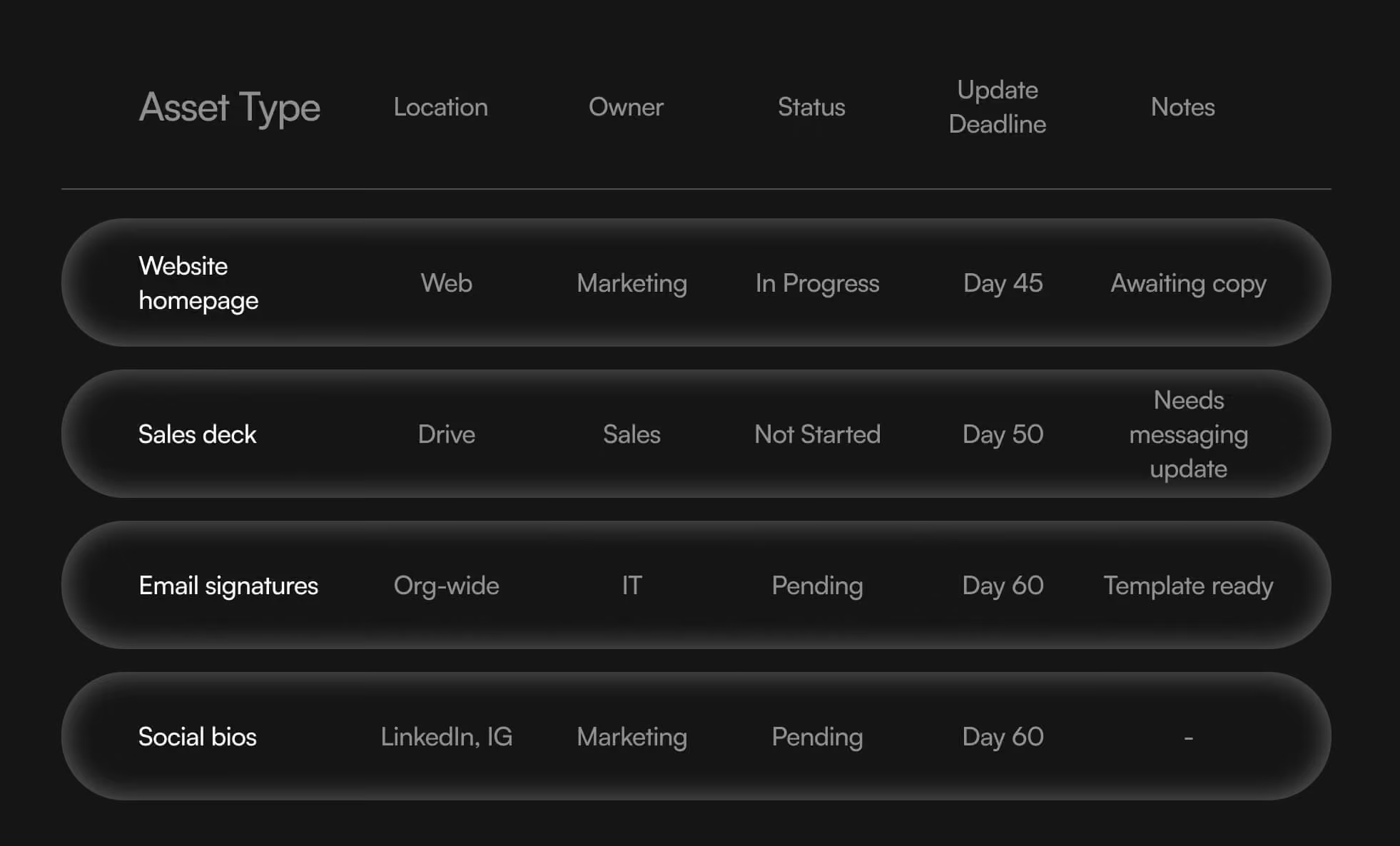
Create one shared inventory of the materials and systems affected. Assign a named owner to each item and record what must happen before it can be approved or published.
Use the following copyable entry for each asset in a document, spreadsheet or project-management tool.
Asset name: [Name and application]
Owner: [Person responsible for completion]
Current URL or file location: [Link to the existing asset]
Replacement URL or file location: [Link to the approved replacement or working file]
Status: [Not started / In progress / In review / Approved / Scheduled / Live / Verified / Blocked]
Dependencies: [Required decisions, assets, approvals or technical work]
Approver: [Person authorized to approve the update]
Priority and due date: [Launch-critical or later phase; deadline]
Verification: [Who will check the published or produced asset, and when]
Example entry
Asset name: Customer rebrand announcement email
Owner: [Email marketing lead’s name]
Current URL or file location: [Link to the current email template]
Replacement URL or file location: [Link to the rebrand announcement draft]
Status: Blocked
Dependencies: Approved narrative, verified announcement page, confirmed send list and tested sender details
Approver: [Brand owner’s name]
Priority and due date: Launch-critical; send after the website passes launch checks
Verification: [Named reviewer confirms links, display and scheduled send settings]
Distinguish approved from verified. An approved design may still be uploaded incorrectly, linked to an outdated page or missing from an active workflow.
4. Prepare Launch-Critical Assets
Prioritize the materials customers are most likely to encounter:
- Website pages and announcement content.
- Sales presentations and active proposals.
- Email signatures and customer email templates.
- Social profiles and campaign landing pages.
- Transactional messages and automated workflows.
- Brand guidelines and shared templates.
Give every remaining asset an owner and transition date. Lower-visibility materials can follow later if their temporary use will not create confusion.
Readiness checkpoint: Critical assets are approved, teams are prepared and unresolved blockers have an owner and resolution plan.
Phase 2: Days 31–60 — Public Launch and Coordinated Transition
Choose a launch date within this phase based on readiness. Coordinate the website, announcements and active customer touchpoints around that date.
1. Website Launch: Your Central Reference Point
Your website should explain the rebrand and help visitors complete the tasks they came to perform. If the name changes, make the relationship between the old and new business clear.
Complete checks before launch, then repeat critical tests on the live site.
Content and functionality
- Confirm the approved name, messaging, identity and contact details.
- Test navigation, downloads, search and important mobile layouts.
- Submit forms and verify delivery to the correct inbox or CRM.
- Test checkout, booking, account access and integrations where applicable.
- Confirm who can authorize a fix or restore the previous version if a critical issue occurs.
Redirects and search visibility
If URLs change, map each old URL to its relevant replacement and implement permanent server-side redirects. Test for broken destinations, loops and unnecessary redirect chains. Avoid sending unrelated retired pages to the homepage.
Update internal links, canonical URLs and XML sitemaps. Remove launch-blocking staging restrictions from pages intended for indexing, while keeping private content protected. Confirm Search Console access and follow the applicable domain-move steps.
Use Google’s site-migration guidance to plan URL changes. Monitor old and new URLs after launch; redirect testing alone does not establish that a migration is complete.
Analytics and measurement
- Record baseline traffic, conversions and lead quality before launch.
- Verify that tracking loads on the intended pages.
- Test important events, including successful enquiries or purchases.
- Check for missing or duplicate events and confirm consent choices behave as configured.
- Preserve campaign parameters through redirects and check cross-domain journeys where relevant.
- Record the launch date and any measurement changes so later comparisons remain interpretable.
Accessibility
Evaluate the site against the agreed WCAG 2.2 accessibility criteria and conformance level. Include keyboard navigation, visible focus, colour contrast, image alternatives, form labels, error messages and zoom behaviour.
Combine automated checks with manual testing of important journeys. Resolve issues that prevent customers from completing essential tasks before launch.
Launch checkpoint: The live site passes critical checks before announcement traffic is directed to it.
2. Announce the Change to Customers
Your announcement should answer:
- Why the business is evolving.
- What customers will notice.
- What remains consistent.
- Whether customers need to take action.
- Where they can get help.
Our guide on how to announce a rebrand explains how to structure that communication.
Prepare an email and a website page that teams can reference. A founder video may also be useful if it adds a clear, personal explanation.
Notify affected customers early enough to act if the transition changes login details, payment instructions, service access or other practical requirements.
3. Update Channels According to Dependencies
Use the asset tracker to coordinate publication. A workable sequence may be:
- Verify the website and announcement page.
- Activate updated sales, support and email materials.
- Send customer communications.
- Update social profiles and public listings.
- Launch refreshed campaigns and scheduled content.
- Verify active automations and third-party references.
Adjust the sequence to your business. Campaigns should point to verified destinations, and employees should have approved materials before responding to customers.
If an old domain or email address still receives enquiries, maintain an appropriate transition route and monitor it.
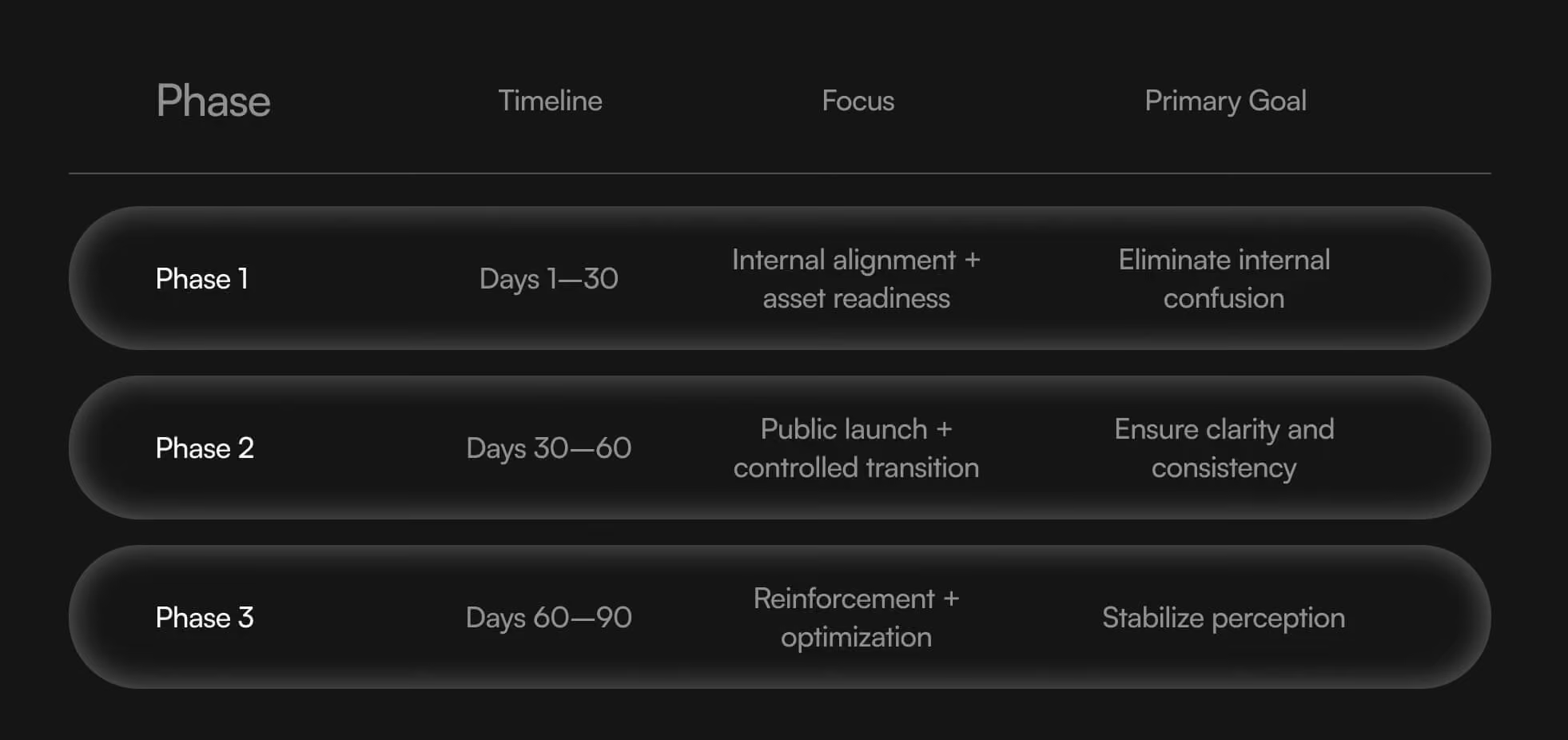
Phase 3: Days 61–90 — Follow-Through and Improvement
Use this phase to resolve remaining issues, complete planned updates and assess how customers are navigating the change.
1. Monitor Customer and Technical Signals
Review:
- Customer questions and support themes.
- Form delivery, checkout and account-access issues.
- Broken links, redirects and search indexing.
- Traffic and conversions by source.
- Enquiry quality and recurring sales objections.
- Searches for both the old and new names, where relevant.
Investigate changes rather than assuming they are normal. A drop in recorded conversions could reflect a tracking failure, a usability problem or a change in traffic quality.
2. Reinforce the Explanation Where Needed
Use customer questions to guide follow-up content. Update FAQs, sales materials and onboarding messages when the same misunderstanding appears repeatedly.
Relevant case studies, product explanations and email content can connect the new identity with the business customers already know. Communication should provide useful context and evidence; repetition alone does not establish trust.
3. Complete Remaining Asset Updates
Close outstanding items such as archived downloads, internal templates, supplier records and lower-priority printed materials.
Prioritize by customer exposure and operational importance. Active contracts, invoices, proposals or location signage may need attention before launch rather than being deferred to this phase.
Verify replacements and archive superseded working files so employees do not accidentally reuse them.
Completion checkpoint: Remaining exceptions are documented, critical experiences work as intended and ongoing ownership is established.
Governance Model: Who Owns the Rollout?
Assign responsibilities before work begins:
- Brand owner: Approves the overall direction and resolves brand decisions.
- Rollout lead: Maintains the tracker, coordinates dependencies and escalates blockers.
- Asset owners: Complete assigned updates and arrange verification.
- Reviewers: Check messaging, design or technical requirements.
- Launch decision-maker: Confirms readiness and authorizes publication.
One person may cover several roles in a smaller business. Larger organizations may need departmental representatives, but each decision should still have a clear owner.
Keep approved files in a central location and document how teams request changes, report problems and retire outdated materials.
Internal Communication Schedule
Use this sample cadence for the preparation phase, adjusting it to your launch date.
Week 1: Explain the direction
Brief leadership and department heads on the rationale, scope, responsibilities and expected timing.
Week 2: Prepare each team
Run role-specific sessions covering customer questions, new materials and workflow changes.
Week 3: Share approved resources
Distribute the FAQ, templates and asset-library access. Ask teams to identify missing materials or unresolved questions.
Week 4: Confirm readiness
Review critical assets, test customer journeys and confirm launch responsibilities and escalation contacts.
Launch day and afterward
Tell employees when the change is live, where to report issues and when fixes or updated guidance become available. Continue brief updates until the transition is stable.
Want to learn more about Rebrands, Brand Strategy and Brand Identity? Keep reading!
If you need help with your companies branding, contact us for a free custom quote.
Choosing Your Rollout Model

Choose your rollout model according to what is changing, how customers interact with the business and which updates depend on one another. Company size alone does not determine the right approach.
Soft Launch: Introduce Changes to a Limited Audience
A soft launch makes the new brand available in a defined context before wider release. This might involve selected customers, one location or a limited set of materials.
It can be useful when you want to test customer understanding or operational readiness before expanding the rollout. Define what you are testing, how feedback will be collected and what must be resolved before proceeding.
A soft launch is not automatically lower risk. If customers encounter both identities, explain the relationship and make sure essential services remain easy to recognize and access.
Channel-by-Channel Launch: Sequence Updates Around Dependencies
A channel-by-channel rollout introduces changes in an agreed order. For example, the website and customer announcement may go live first, followed by campaign materials and physical assets with longer production lead times.
This approach suits projects where different channels cannot realistically change together. Its success depends on managing the overlap.
Document:
- Which channels change first and why.
- How long previous materials may remain in use.
- What explanation customers will see during the transition.
- Who verifies each update and closes outstanding items.
Treat closely connected touchpoints as a group. An announcement email, its landing page and the support team’s guidance should be ready together.
Coordinated Launch: Update Critical Touchpoints Together
Often called a “big bang” launch, this approach introduces the new brand across the most important customer-facing channels on a shared date.
It may be appropriate for a rename, merger or substantial repositioning when prolonged overlap would create confusion. However, those changes do not always require every asset to be replaced simultaneously.
Identify the touchpoints that must change together, confirm their readiness and assign people to monitor the launch. Document any exceptions, such as packaging inventory or third-party listings that require more time.
Combine Approaches Where Necessary
A hybrid rollout may be the most practical choice: test internally or with selected customers, coordinate the main public launch, then complete lower-priority updates in phases.
Before choosing, ask:
- Would encountering both identities confuse customers?
- Are domains, accounts, payments or service access affected?
- Which updates must happen together?
- What production or third-party dependencies limit timing?
- Can the team monitor and resolve issues during the launch window?
Use those answers to set the sequence and readiness requirements.
Common Rebrand Rollout Mistakes
1. Approving Visuals Without Agreeing on the Explanation
A new identity can reach customers before employees have a consistent way to explain it.
How to prevent it: Approve the rebrand narrative and customer FAQ alongside the launch assets. Make sure teams understand the reason for the change and any practical implications.
2. Giving Affected Customers Too Little Notice
Customers may need time to update records, recognize a new sender or prepare for changes to service access.
How to prevent it: Segment communications by impact. Notify customers who must take action before the change takes effect, and give them clear instructions and a support contact.
3. Leaving Mixed Materials in Use Without a Transition Plan
An updated website and an old sales presentation may communicate conflicting names, offers or promises.
How to prevent it: Track active assets, prioritize those customers encounter most often and document any temporary overlap. Distinguish planned exceptions from missed updates.
4. Treating Approval as Proof of Successful Implementation
An approved asset can still be published incorrectly. A redesigned form may look right while sending enquiries to the wrong destination.
How to prevent it: Assign a separate verification step after publication or production. Check the actual customer experience, including links, forms, downloads and automated messages.
5. Launching Without Clear Ownership
Issues remain unresolved when nobody knows who can approve a correction or decide whether launch should proceed.
How to prevent it: Name the rollout lead, asset owners, reviewers and final decision-maker. Keep escalation instructions accessible during the transition.
6. Letting the Date Override Readiness
A fixed launch date can put pressure on teams to publish with unresolved dependencies.
How to prevent it: Agree in advance which issues block launch and which can be addressed afterward. If critical customer journeys are not ready, adjust the scope or timing and communicate the decision clearly.
How to Know If Your Rollout Is Working

A successful rollout helps customers understand the change, keeps essential journeys functioning and gives employees the tools to communicate consistently. Assess those outcomes alongside the business objectives behind the rebrand.
Record a baseline before launch, then review technical issues and customer questions frequently during the initial transition. Evaluate broader changes in perception and performance over a period suited to your buying cycle.
Signs the Transition Is Working
- Customer understanding: People recognize the connection between the previous brand and the new one.
- Working customer journeys: Enquiries, purchases, bookings and account access function as intended.
- Consistent communication: Sales and support teams use the approved explanation and current materials.
- Verified implementation: Launch-critical assets are live and checked, with remaining updates assigned.
- Internal confidence: Employees know where to find resources and how to escalate questions.
- Reliable measurement: Tracking works, and the team can compare results without confusing measurement changes with customer behaviour.
Customer questions are not automatically a sign of failure. Their frequency, subject and persistence help you judge whether the transition needs clearer communication.
Signals That Need Investigation
Repeated questions about ownership or service continuity
Check whether your announcement clearly explains what changed and what did not. Update the website FAQ and team guidance when the same misunderstanding recurs.
A decline in traffic or conversions
First verify analytics, redirects, forms and purchasing journeys. Then examine traffic sources, campaign activity, seasonality and other changes before attributing the decline to the new brand. Direct traffic alone is not a reliable measure of recognition.
More sales objections or unsuitable enquiries
Review whether the new messaging accurately describes the offering and reaches the intended audience. Ask sales teams to record the objections so you can distinguish a positioning issue from a pricing or product-fit problem.
Employees continuing to use old materials
Check whether replacement files are available, editable and suitable for daily tasks. Repeated workarounds may reveal missing templates or training needs.
Persistent use of the old name
Assess the context. Existing customers may continue using a familiar name while fully understanding the change. Focus on whether they can find, recognize and transact with the business.
Turn Monitoring Into Action
Keep a shared issue log with the evidence, customer impact, owner and resolution date. Prioritize problems that prevent access, interrupt purchases or misdirect enquiries.
Review patterns across support feedback, sales conversations and website data. Fix the underlying issue, verify the correction and share updated guidance with affected teams.
Use relevant brand health metrics to assess recognition and understanding beyond the launch period. Operational stability is an early success measure; whether the rebrand achieves its intended positioning and business goals requires continued evaluation.
Finish the Transition With Clear Ownership
The rollout is ready to move into ongoing brand management when critical assets are verified, essential customer journeys work, teams can explain the change and remaining exceptions have owners and deadlines.
If strategic decisions are still unresolved, return to the business rebranding strategy guide before expanding implementation. Clear positioning and an agreed scope give the rollout team a dependable basis for decisions.
The Branded Agency helps businesses connect rebrand strategy with identity, websites, packaging and launch communications. We can help define priorities, coordinate implementation and prepare your team to maintain the brand after launch.
Book a discovery call to discuss your rebrand and what needs to be ready for a coordinated launch.

Quincy Samycia
As entrepreneurs, they’ve built and scaled their own ventures from zero to millions. They’ve been in the trenches, navigating the chaos of high-growth phases, making the hard calls, and learning firsthand what actually moves the needle. That’s what makes us different—we don’t just “consult,” we know what it takes because we’ve done it ourselves.
Want to learn more about brand platform?

If you need help with your companies brand strategy and identity, contact us for a free custom quote.
We do great work. And get great results.
+2.3xIncrease in revenue YoY
+126%Increase in repurchase rate YoY


+93%Revenue growth in first 90 days
+144% Increase in attributed revenue


+91%Increase in conversion rate
+46%Increase in AOV


+200%Increase in conversion rate
+688%Increase in attributed revenue