Webflow vs WordPress for Enterprise Sites in 2026 Which Should You Pick?
08/21/2025
Web Design / Web Dev
Compare Webflow and WordPress for enterprise websites, from security and publishing workflows to integrations, scalability, and total ownership costs.

Choosing between Webflow and WordPress for an enterprise website starts with understanding what your teams need to accomplish. How will marketing publish content? Who will manage security and maintenance? Which integrations, languages, and approval processes must the website support? This guide compares Webflow Enterprise, WordPress VIP, and self-hosted WordPress across the requirements that matter to marketing, IT, and leadership. Explore the trade-offs in governance, performance, flexibility, migration, and ongoing costs to identify the right fit for your organization.

Why This Decision Matters Now


Your CMS affects how quickly your team can publish, how consistently your brand appears across markets, and how much technical support your website requires. As content, integrations, and contributors increase, limitations in the original setup can become harder to manage.
Choosing between Webflow and WordPress starts with defining those operational requirements. Marketing, IT, and leadership should agree on what the website needs to support before comparing platform features.
This guide evaluates three distinct options: Webflow Enterprise, WordPress VIP, and self-hosted WordPress. It covers security, publishing workflows, performance, localization, integrations, content scale, and ownership costs, followed by a decision framework and migration considerations.
The Branded Agency provides Webflow development services, which informs our perspective. The right recommendation should still follow your requirements rather than assume one platform suits every organization.
Webflow vs WordPress: Comparing Enterprise Requirements
Security and Compliance
Webflow Enterprise provides managed infrastructure alongside enterprise security and access capabilities. Review the current audit reports, certifications, and available controls in the Webflow Trust Center, then confirm which features are included in your agreement.
WordPress VIP provides a managed enterprise environment with documented security controls, SOC 2 Type II reporting, and FedRAMP Moderate authorization. Organizations with specific procurement requirements should verify the applicable service and authorization scope. See WordPress VIP’s security overview.
Self-hosted WordPress requires a clear division of responsibility between your organization, hosting provider, and development partner. Define who manages updates, plugin reviews, backups, monitoring, and incident response.
For all three options, platform credentials do not automatically establish compliance for your website’s data collection and processing.
Governance and Collaboration
Webflow Enterprise offers capabilities for managing access and publishing across teams. Confirm how the proposed configuration handles permissions, staging, approvals, and change visibility. Webflow’s enterprise overview outlines its offering.
WordPress VIP supports governance across content and code, including publishing controls and reviewed deployment workflows. Your implementation still needs defined roles and editorial procedures.
Self-hosted WordPress can use built-in roles alongside custom development or selected extensions. The resulting workflow depends on how those capabilities are configured.
Ask each provider to demonstrate a real publishing scenario: an editor creates a page, a reviewer approves it, and an authorized person publishes it.
Performance and Hosting
Webflow Enterprise bundles managed hosting with its platform. Evaluate performance using representative pages, including the scripts and integrations your production website will use.
WordPress VIP provides managed infrastructure designed for enterprise workloads. Review the proposed service commitments and test your application against its expected traffic and functionality.
Self-hosted WordPress allows you to select the hosting architecture, caching, and delivery services. That flexibility also requires ownership of configuration and performance management.
No platform name guarantees a fast website. Images, fonts, custom code, external scripts, and implementation decisions all affect the visitor experience.
Localization and SEO
Webflow offers an integrated localization product. Confirm the languages, publishing controls, localized content requirements, and additional charges included in your proposal. See Webflow’s localization offering.
WordPress VIP and self-hosted WordPress require a defined multilingual approach, which may involve translation tools, plugins, multisite, or custom implementation.
For either platform, test localized URLs, metadata, language annotations, redirects, and editorial workflows. SEO results depend on content quality and implementation as well as platform capabilities.
Personalization and Testing
Webflow Optimize supports experimentation and personalization. Check its availability, pricing, and suitability for your traffic and testing requirements rather than assuming it is included in every agreement. See Webflow Optimize.
WordPress implementations can connect testing and personalization tools according to the selected architecture. Include integration, consent handling, measurement, and ongoing management in the scope.
For either option, define the decisions your experiments should inform and whether you have enough traffic to produce useful results.
Extensibility and Headless Requirements
Webflow supports integrations and custom development, but each requirement should be checked against the relevant APIs, platform limits, and deployment options. Avoid assuming that exporting a design reproduces the complete hosted website.
WordPress provides a REST API that allows external applications to interact with website content. GraphQL requires an additional implementation rather than being a built-in WordPress core capability.
If you need a headless architecture, include frontend hosting, previews, search, forms, caching, and deployment in the evaluation. These introduce responsibilities beyond choosing the CMS.
Content Scale
Webflow Enterprise should be assessed against the content capacity and limits specified in your agreement. Confirm CMS items, Collections, API usage, bandwidth, and localization requirements before committing.
WordPress VIP and self-hosted WordPress should be evaluated against the proposed architecture and workload. Large content libraries, complex queries, frequent publishing, and traffic spikes require appropriate implementation and testing.
A useful proof of concept should reflect your content relationships and publishing volume, not just demonstrate a few sample pages.
Cost and Operational Responsibilities
Webflow can consolidate several website services into one platform relationship. Your budget may still include add-ons, external tools, agency support, and internal staff time. Our Webflow website cost guide explains these cost categories.
WordPress VIP combines a managed platform agreement with implementation and ongoing application work. Confirm which responsibilities belong to VIP and which remain with your team or agency.
Self-hosted WordPress requires a budget for hosting, development, extensions, maintenance, and operational support.
Compare all three over the same ownership period and against the same requirements. The strongest proposal will make both the costs and the responsibilities clear.
Free Brand Health Audit
Make sure your brand is built to sell
Search has changed. Your customers aren't just Googling anymore. They're asking ChatGPT, Perplexity, Gemini and other AI platforms what to buy, who to trust and which brands they should consider.
If your brand isn't showing up clearly in those answers, you're already losing opportunities. Our free Brand Health Audit shows you where your brand stands across traditional search, AI search and brand positioning.
Sample brand audit
Live preview
Traditional search
72
AI search (GEO)
34
Brand positioning
58
Decision Framework: How to Choose


Use this weighted scoring table (example):
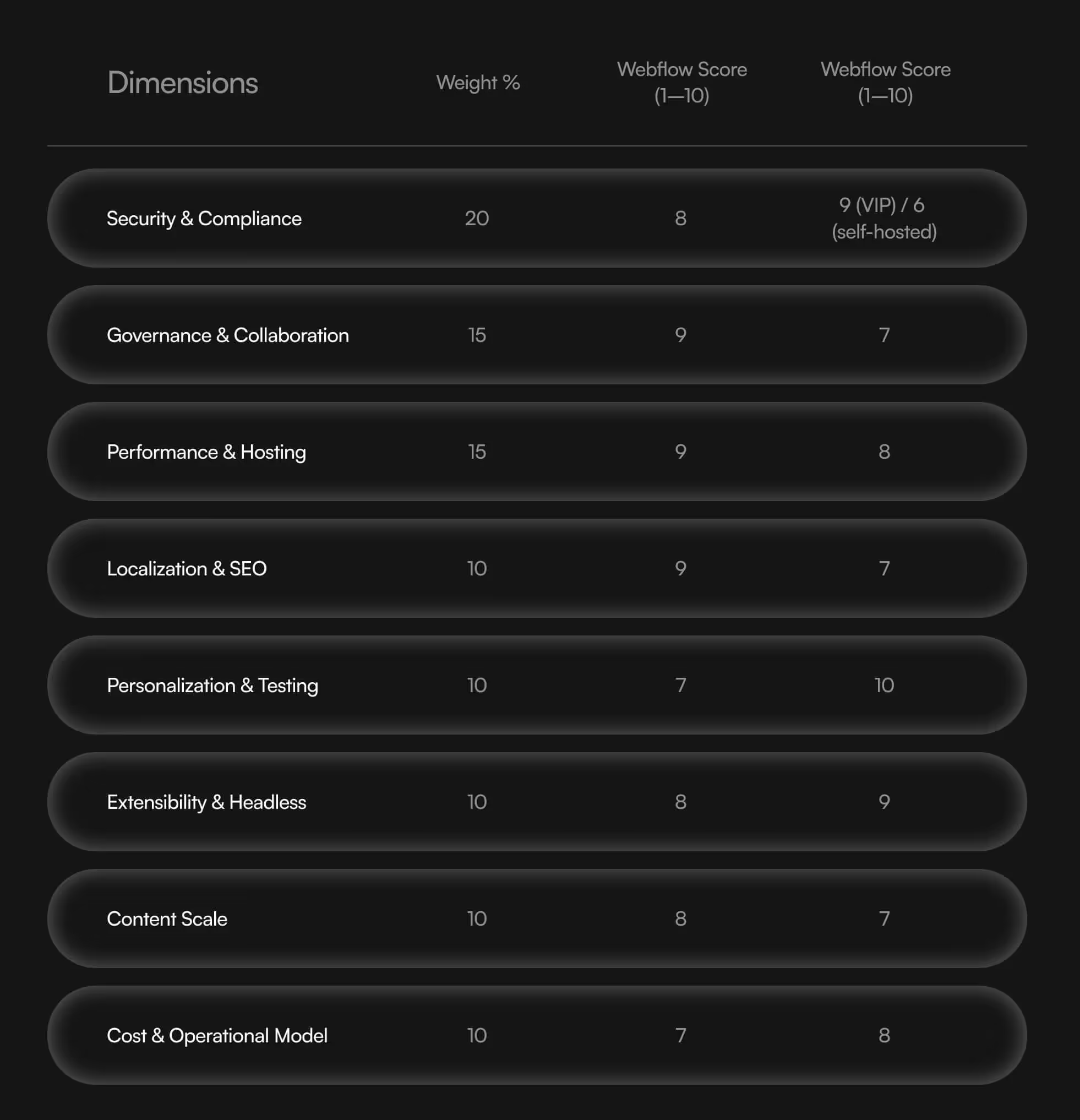
Decision Framework: How to Choose
Start with your organization’s requirements, then compare Webflow Enterprise, WordPress VIP, and self-hosted WordPress separately. Each option should be evaluated against the same content, workflows, integrations, and support expectations.
Identify Non-Negotiable Requirements
Before assigning scores, document anything the platform must support. This might include specific security controls, publishing approvals, content volumes, language requirements, or essential integrations.
Confirm these requirements through documentation, demonstrations, and contractual commitments where appropriate. A high overall score should not outweigh a missing mandatory capability.
Weight the Criteria Around Your Priorities
The following weights are an illustrative starting point, not a universal formula:
- Security and governance — 25%: Required controls, access management, approvals, and auditability.
- Publishing and team workflows — 20%: How effectively your team can create, review, and publish content.
- Integrations and flexibility — 20%: Compatibility with essential systems and custom functionality.
- Content scale and localization — 15%: Capacity for your content model, languages, and anticipated growth.
- Total ownership cost — 15%: Implementation, subscriptions, maintenance, and internal staffing over three years.
- Migration feasibility — 5%: Content transfer, URL preservation, testing, and launch complexity.
Adjust these weights before reviewing vendors so the scoring reflects your priorities.
Score Each Option Using Evidence
Rate each criterion from 1 to 5:
- 1: Substantial gaps or an unsuitable implementation.
- 2: Partially meets the requirement, with significant additional work.
- 3: Meets the requirement with manageable configuration and support.
- 4: Meets the requirement well, with limited additional effort.
- 5: Demonstrably meets the requirement with minimal friction for your team.
Mark unverified capabilities as “not yet verified” rather than assuming they are supported. Record the evidence, required plan, additional tools, and ongoing responsibilities behind each score.
Calculate each weighted contribution as:
Criterion score ÷ 5 × criterion weight
Add the contributions for a total out of 100 once all criteria have been assessed.
Interpret the Results Without an Arbitrary Cutoff
A higher score indicates a stronger fit under your chosen assumptions. It does not automatically determine the right platform, and a ten-point lead is not a universal decision rule.
Webflow Enterprise may be the stronger fit if your evaluation demonstrates effective marketing workflows and the proposed configuration meets your integration, governance, and content requirements.
WordPress VIP may be the stronger fit if your organization needs a managed enterprise WordPress environment and its proposed workflows, extensibility, and operational support best match your requirements.
Self-hosted WordPress may be the stronger fit if control over hosting and implementation is a priority and you have the resources to manage the resulting responsibilities.
If the results are close—or change substantially when you adjust the weights—run a focused pilot. Test a representative content model, approval workflow, integration, and migration sample. A simple microsite will only provide useful evidence if it reflects the requirements driving your decision.
Want to learn more about Website Design, Development and E-commerce? Keep reading!
If you need help with your company’s website and development, contact us for a free custom quote.
Migration & Rollout Strategy

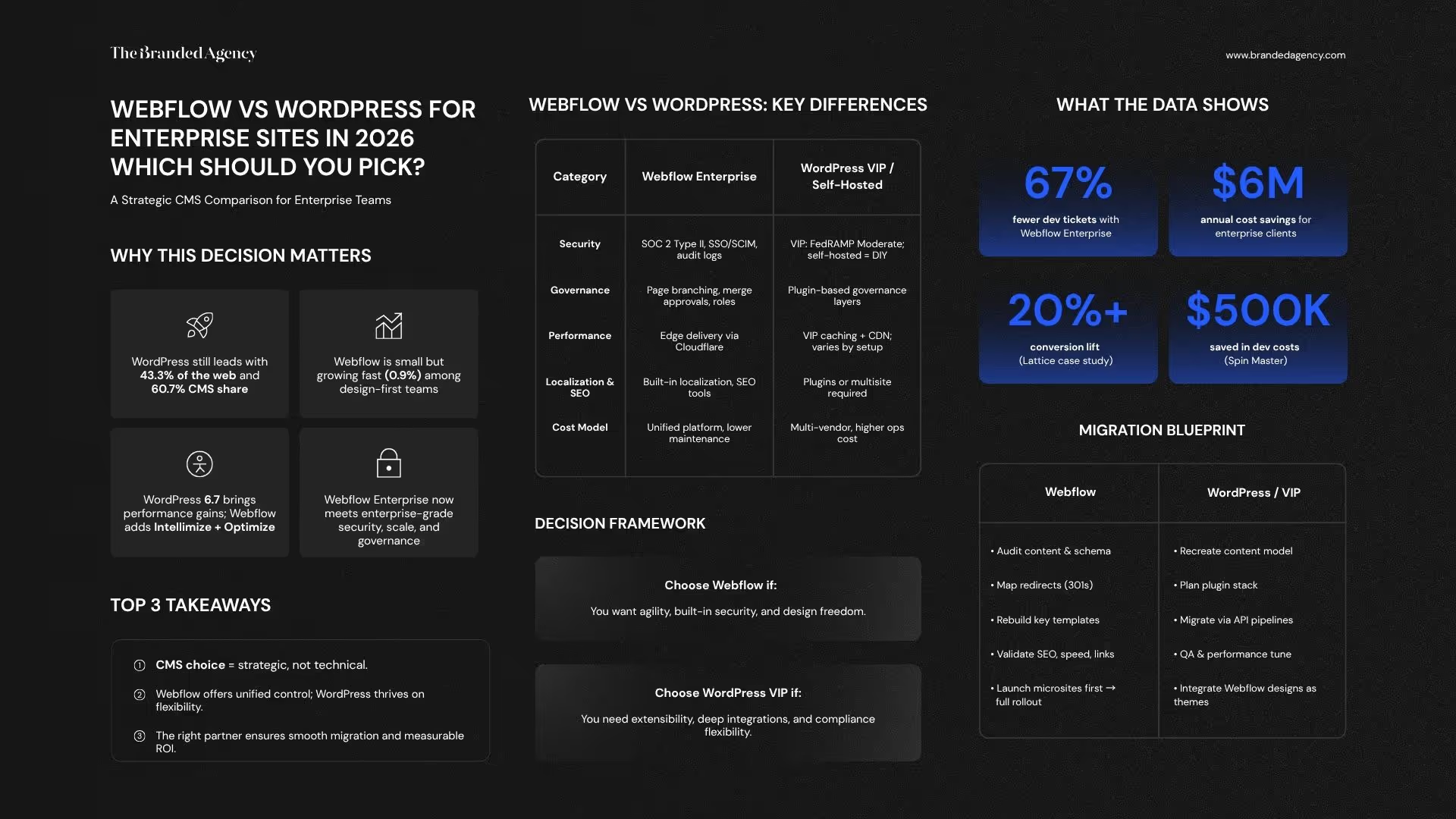
A CMS migration involves more than moving content. It requires rebuilding templates, reconnecting systems, validating search settings, and preparing your team to manage the new website.
Before implementation begins, define the launch requirements, responsibilities, and recovery process. Preserve existing URLs where practical and document every planned change.
Moving From WordPress or Another CMS to Webflow
Start with a content and functionality audit. Identify which pages should remain, which need improvement, and which can be consolidated or retired.
The migration plan should include:
- Content modelling: Map existing content to Webflow Collections, fields, references, and page templates.
- A migration pilot: Import a representative sample to check formatting, media, relationships, and platform limits before migrating everything.
- Template development: Rebuild layouts and interactions for Webflow, including responsive behaviour and accessibility requirements.
- Integration replacement: Determine how existing forms, search, plugins, and connected services will work in the new implementation.
- Search validation: Check redirects, metadata, canonical URLs, language annotations, internal links, and indexability.
- Operational testing: Verify lead delivery, analytics, permissions, and publishing workflows.
Webflow’s WordPress migration guidance provides a starting point for content transfer. Treat this as one part of the migration; imported content does not automatically reproduce the original website’s design or functionality.
Moving From Webflow to Self-Hosted WordPress
Define the WordPress content model before transferring data. Map Webflow Collections to the appropriate post types, taxonomies, and fields, and document how content relationships will be preserved.
Rebuild the design as WordPress templates, blocks, or theme components. Do not assume a Webflow code export becomes a functioning WordPress theme or reproduces CMS behaviour.
Select the hosting environment and necessary extensions, then assign responsibility for updates, backups, security, and support. Test the migrated content, forms, search, integrations, and redirects before launch.
Moving From Webflow to WordPress VIP
WordPress VIP requires the same content and design planning, plus coordination with VIP on the proposed architecture and deployment process.
Confirm the approach to custom code, plugins, environments, migration tooling, and launch readiness with the implementation team. Document which responsibilities belong to VIP, your agency, and your internal team.
Planning the Launch and Recovery Process
Use a staging environment to validate the website before switching production traffic. Set a content freeze or final synchronization process so edits made during development are not lost.
A phased rollout can be useful when sections are operationally separable, but it is not automatically simpler. Define how navigation, analytics, search, and redirects will work while both systems are active.
For URL changes, follow Google’s site-move guidance. Redirects and testing help manage migration risk, but they do not guarantee unchanged rankings.
Assign launch owners,
Frequently Asked Questions About Webflow and WordPress for Enterprise


1. How does choosing a CMS affect brand consistency?
Your CMS influences how teams use templates, update content, and manage design changes. Both Webflow and WordPress can support a consistent brand when the implementation includes reusable components, clear permissions, and documented publishing guidelines.
Evaluate whether everyday editors can create the pages they need while staying within your design system. Brand consistency depends on that setup and its ongoing management—not simply the platform you select.
2. Is Webflow better than WordPress for brand storytelling?
Neither platform automatically produces stronger storytelling. Your messaging, content, design, and user experience determine how effectively the website communicates your brand.
Webflow may suit teams that prefer visual website production. WordPress may suit organizations with established editorial workflows or custom publishing requirements. Test a representative page in each proposed setup to assess creative flexibility and ease of editing.
3. How can enterprises manage brand governance across teams and regions?
Start by defining who can edit content, change designs, approve updates, and publish. Then confirm that the proposed platform configuration supports those responsibilities.
Webflow Enterprise offers advanced access and governance capabilities, but specific features should be verified against your agreement. WordPress VIP provides managed enterprise controls, while self-hosted WordPress requires your team and providers to configure and maintain the appropriate workflows.
For security requirements, review the Webflow Trust Center and WordPress VIP’s security documentation alongside your organization’s policies.
4. Which platform supports faster campaign launches?
The faster option is the one that lets your team complete its actual workflow with fewer unnecessary handoffs.
Webflow can support visual production using reusable layouts. WordPress can also support independent publishing through well-designed blocks and templates. Either implementation can become slow if routine changes require specialist intervention or unclear approvals.
During evaluation, ask a marketer to create, review, and publish a representative campaign page. Measure the time, assistance, and approval steps required.
5. Can Webflow support a growing enterprise website?
Potentially, provided the selected configuration supports your projected requirements. Confirm CMS capacity, content relationships, API usage, bandwidth, localization, and publishing needs before committing.
Test a representative content model and agree on capacity with the provider. Do not assume an Enterprise agreement removes every limit. Apply the same scrutiny to WordPress VIP and self-hosted WordPress, where practical scale also depends on architecture, hosting, and operational resources.
6. How does Webflow support localization?
Webflow offers an integrated localization product for adapting website content and managing localized experiences. Confirm the supported capabilities, number of locales, publishing workflow, and pricing for your configuration. See Webflow’s localization offering.
Translation still needs editorial review. Regional messaging, imagery, terminology, and calls to action should reflect the audience in each market. WordPress localization also requires a defined implementation and ownership process.
7. How does The Branded Agency support brand consistency after migration?
For Webflow engagements, we can create reusable templates, shared styles, CMS structures, and publishing guidance that help your team apply the brand consistently.
Training and documentation help editors understand what they can change and when additional design or development support is needed. Ongoing reviews, maintenance, and improvements can be included in a separately defined support scope.
To discuss your website requirements, explore our Webflow development services or contact us to plan your next steps.

Quincy Samycia
As entrepreneurs, they’ve built and scaled their own ventures from zero to millions. They’ve been in the trenches, navigating the chaos of high-growth phases, making the hard calls, and learning firsthand what actually moves the needle. That’s what makes us different—we don’t just “consult,” we know what it takes because we’ve done it ourselves.
Want to learn more about brand platform?

If you need help with your companies brand strategy and identity, contact us for a free custom quote.
We do great work. And get great results.
+2.3xIncrease in revenue YoY
+126%Increase in repurchase rate YoY


+93%Revenue growth in first 90 days
+144% Increase in attributed revenue


+91%Increase in conversion rate
+46%Increase in AOV


+200%Increase in conversion rate
+688%Increase in attributed revenue